Plugins
Install and manage kandev plugins: Go backends kandev spawns and supervises, with an optional native frontend bundle.
Plugins extend kandev without forking core: a plugin ships a Go backend that kandev spawns and supervises as a subprocess over a strict typed gRPC protocol, and can optionally ship a native frontend bundle that kandev loads into the SPA. This page covers what plugins are, how to install and manage them, and the current security posture. To discover and install plugins from the in-app catalog, see the Plugin marketplace. For building a plugin, see Authoring a plugin. For the manifest schema, see Plugin manifest reference.
Plugins are an operator-level, instance-wide capability, there is no per-user plugin access. Installing a plugin requires an administrator when authentication is enabled. They ship in the base product with no feature flag to turn on: Settings > Plugins is always available in the sidebar. Because loaded plugin code runs with backend privileges, install only plugins you trust, see Security posture.
Quick path
- Open Settings > Plugins.
- Install from the marketplace, a URL, or a local tarball.
- Let the installer verify package integrity before it extracts or spawns the plugin; review the install result before enabling it.
- Disable or uninstall a plugin when it is no longer trusted or needed.
How it works
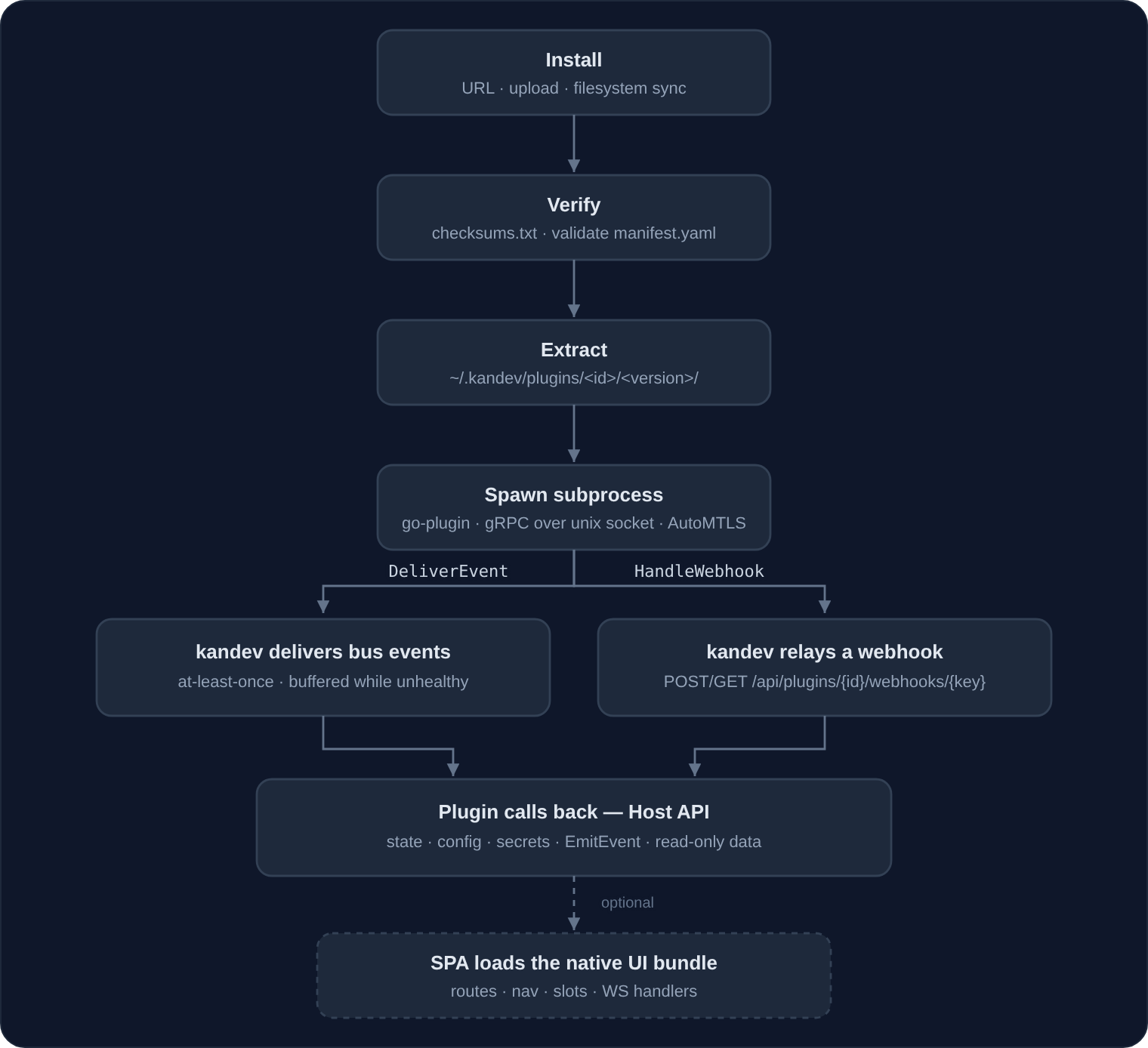
Kandev owns the whole process lifecycle: it extracts the package, spawns the
binary, completes the go-plugin handshake, health-checks it (Ping every
30s), and restarts it on crash or repeated health-check failure (backoff,
max 5 attempts). There is no separate operator-managed plugin process to run
or babysit; install a package and kandev does the rest.
A native UI bundle can register a nav item that renders as a top-level sidebar entry or, when it declares itself part of the Integrations section, alongside kandev's first-party integration links in the main sidebar's Integrations section: expect new entries to appear there once such a plugin is installed and active. Bundles can also inject components into host-defined slots, including icon buttons in the chat composer toolbar (beside the model picker, mic, and send button), so an active plugin can add its own action right where you message an agent. A bundle can also declare keybindings (user-overridable at Settings > Keyboard Shortcuts, with core shortcuts always winning on a conflict) and open host-owned modal windows from anywhere in its code: see Authoring a plugin for both.
Global Status contributions
Native UI bundles can also add compact, live status UI on every hosted route:
function StatusContribution({ slotProps }) {
  return host.jsx(
    "span",
    null,
    `${slotProps.presentation}: ${slotProps.activeTaskId ?? "no task"}`,
  );
}

registry.registerComponent("app-status-bar-left", StatusContribution);
registry.registerComponent("app-status-bar-right", StatusContribution);
Each registration is one opaque item in Kandev's 24 px desktop/tablet status bar
and phone Status drawer. The slot chooses its default side; users can Cmd/Ctrl plus
mouse-drag items across the desktop spacer, and Kandev preserves their order in
backend user settings. Phone shows the saved left sequence followed by the right
sequence, with no drag ordering. slotProps includes
placement, presentation, density, pathname, activeWorkspaceId,
activeTaskId, and activeSessionId. Only one presentation mounts at once;
adapt each contribution for both compact bar and touch-friendly drawer use.
Kandev does not inspect or reorder children inside a contribution, and disabled
plugins return to their saved position when re-enabled.
Full-bleed routes that opt out of host topbar chrome own their Status trigger.
Installing a plugin
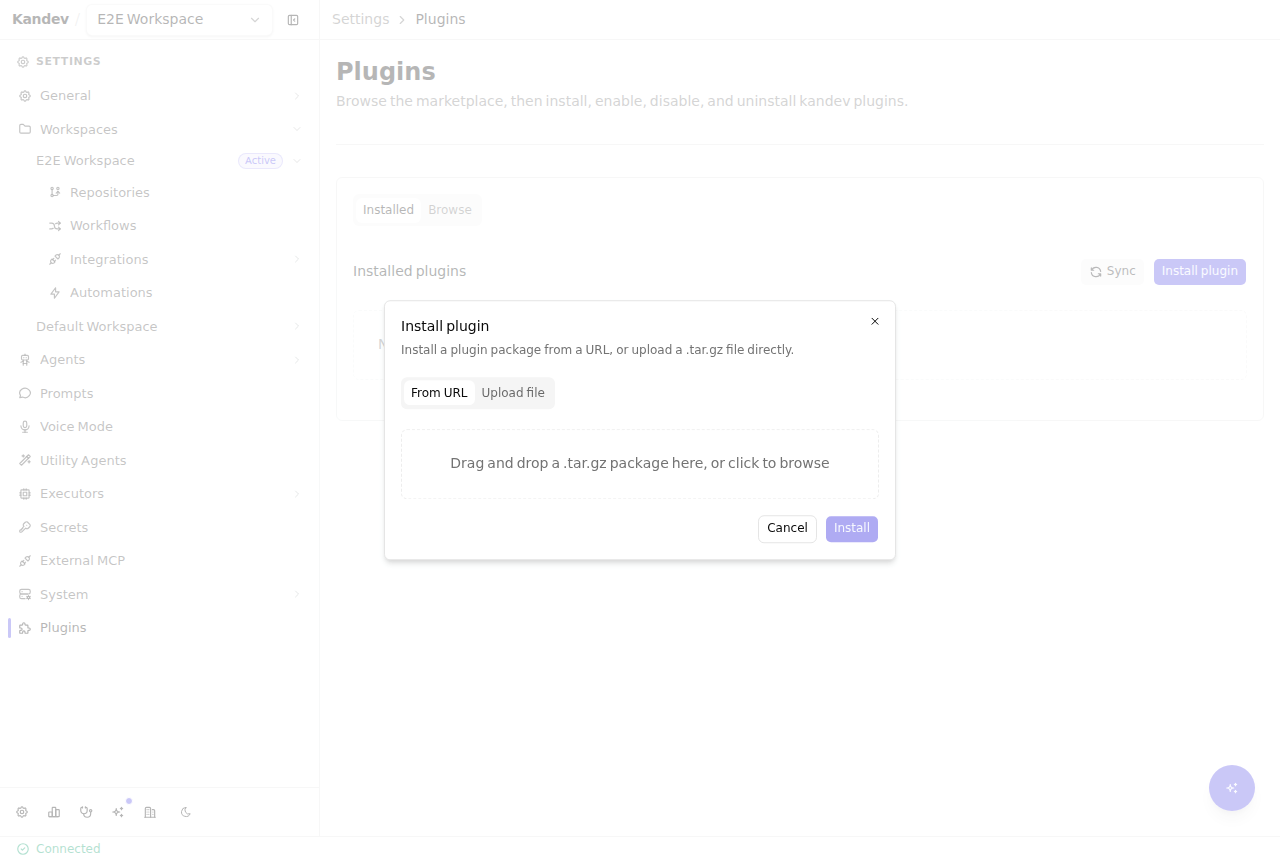
The easiest way to install is from the in-app catalog: Settings > Plugins >
Browse, then Install on a card (see the Plugin
marketplace). To install a plugin that is not in a
configured catalog, open Settings > Plugins and click Install plugin.
You can install from a URL (kandev downloads the tarball) or by uploading a
.tar.gz file directly. No credentials are ever shown or copied; installing a
plugin has nothing to reveal, unlike a webhook-secret/API-key registration
flow.
The same operations are available over HTTP:
# Install from a URL
curl -X POST http://localhost:38429/api/plugins/install \
  -H 'Content-Type: application/json' \
  -d '{"url": "https://example.com/acme-tools-1.0.0.tar.gz"}'

# Install by uploading a local tarball
curl -X POST http://localhost:38429/api/plugins/install \
  -F "package=@acme-tools-1.0.0.tar.gz"
Either path runs the same pipeline:
- Verify
checksums.txtcovers every other file in the tarball and every hash matches (always enforced). - Check for
checksums.txt.sig. Signature verification is not currently wired up, so every package, signed or not, installs and is reported as unsigned today (see "Signed vs. unsigned packages" below). - Parse and validate
manifest.yamlbefore any code runs: schema,idpattern, thecategoriesand UI-surface enums, and thatruntime.executablescontains an entry for the host's OS/arch. - Extract to
~/.kandev/plugins/<id>/<version>/and record the installation in~/.kandev/plugins/<id>.yml. - Spawn the platform-matched binary and complete the go-plugin handshake.
Status is
registeredwhile this is pending,activeonce the handshake succeeds, orerrorif spawn/handshake fails (the operator can retry via Enable). The record keeps a bounded, single-line diagnostic and its failure timestamp so the reason is visible in Settings > Plugins. Before persistence, credential-like values such as PATs, bearer tokens, labeled secrets/API keys, and the host home path are redacted; plugin stdout is not stored verbatim. - Once the new version is confirmed running, delete the plugin's older extracted versions, keeping the version now running plus the one it replaced as a rollback target (see "Version retention on disk"). This step is skipped entirely when the install or the spawn fails, and a deletion that fails is logged without failing the install. Skipping it is not the same as deleting nothing: an install that extracted successfully but could not be recorded is rolled back, which removes that one new version directory and restarts the previous one.
A successful install that failed to spawn returns HTTP 201 with a
warning field rather than failing outright. The package is installed,
just not yet running.
Once installed, the plugin appears in the list with its category, a status
badge (active), a signing badge (unsigned today), and Disable and
Uninstall actions. Selecting the row anywhere opens that plugin's own
settings page; a Setup required badge marks a plugin whose manifest declares
a required setting that has no value yet:
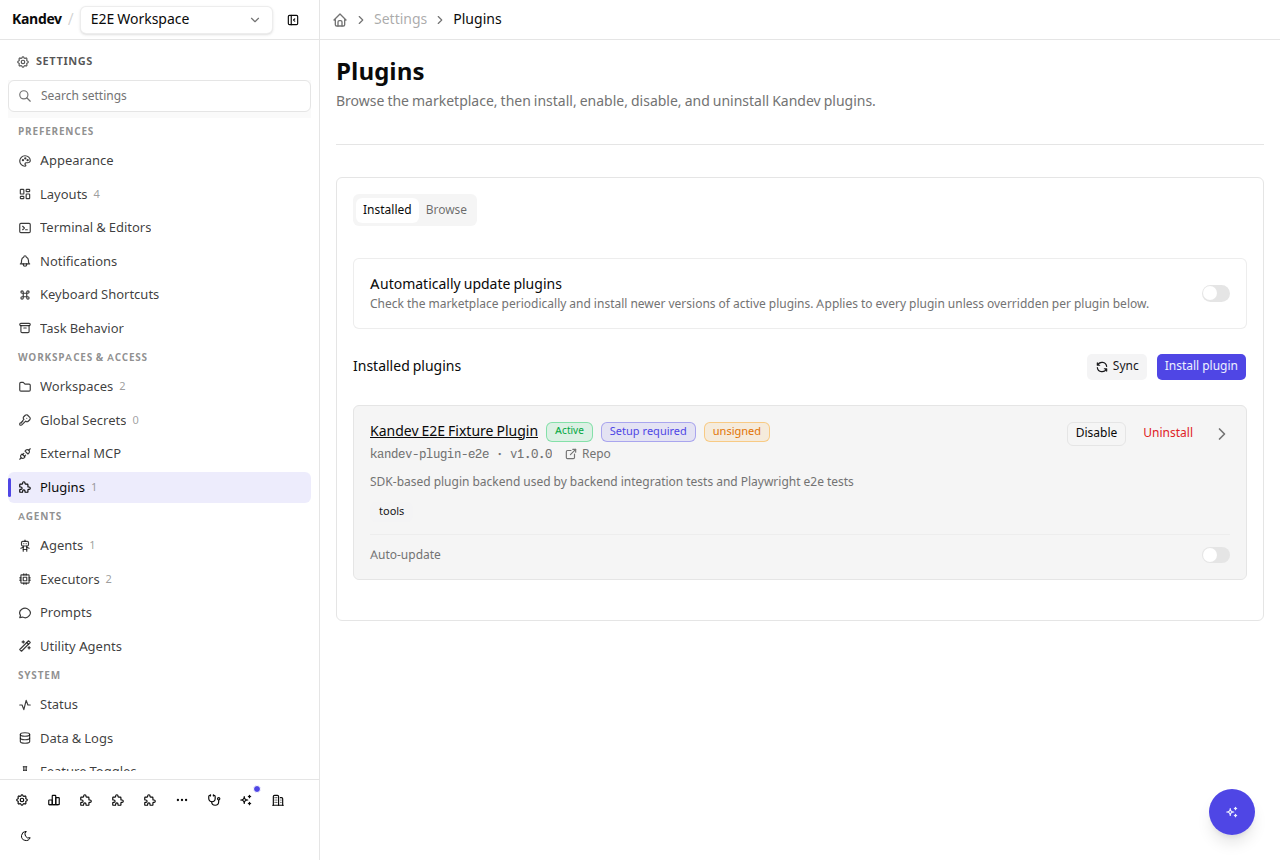
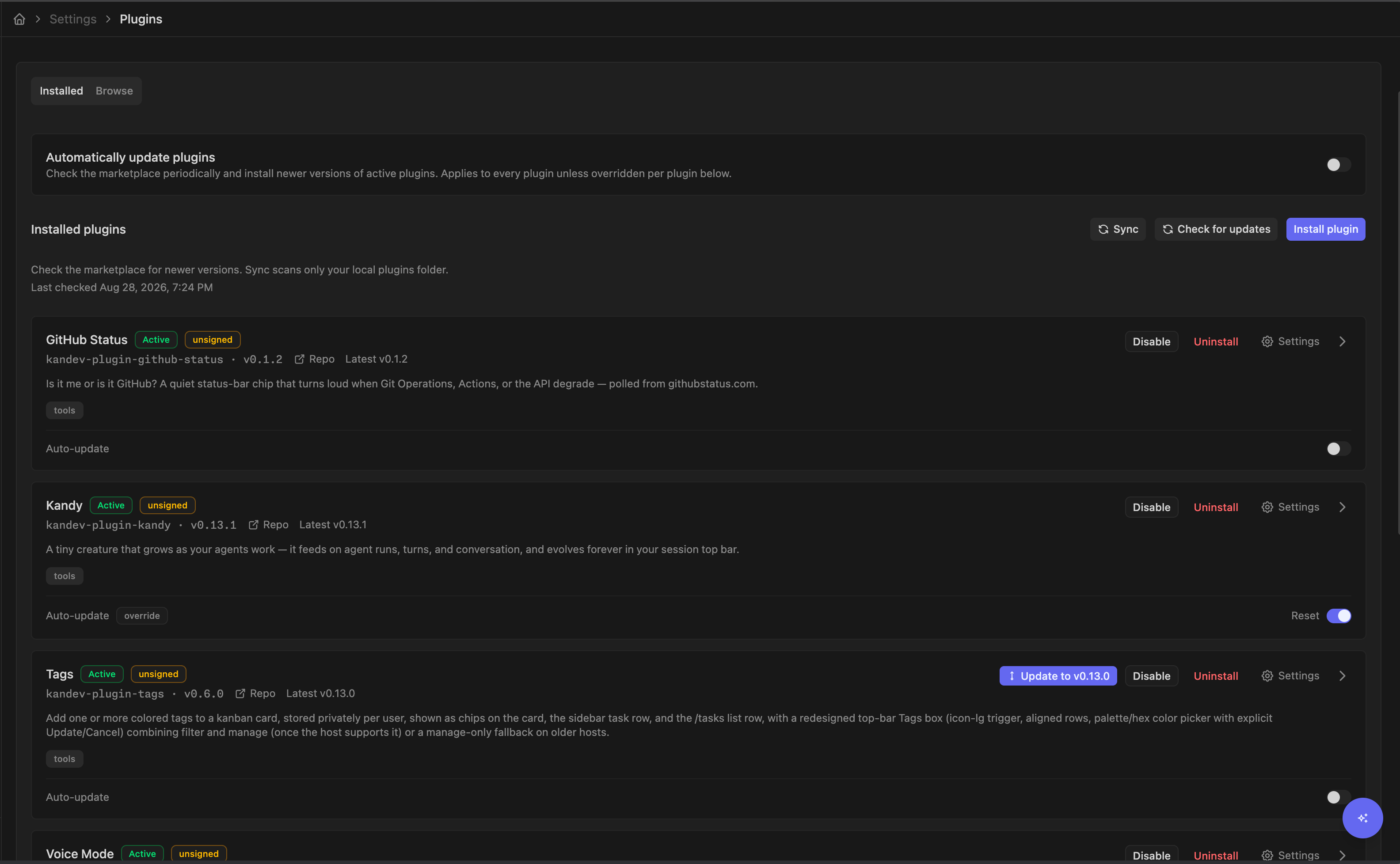
The Installed tab also gives you an overview of automatic updates, installed versions, available updates, and per-plugin controls:
Filesystem sideload and Sync
Besides install-by-URL/upload, an operator with shell access to the host can
place plugin content directly under ~/.kandev/plugins/ without going
through the install endpoint. The Sync button in Settings > Plugins (and
POST /api/plugins/sync) reconciles kandev's registry with what is actually
on disk:
- A dropped directory (
~/.kandev/plugins/<id>/<version>/manifest.yaml) placed manually with no existing record is validated and registered with statusdisabled, never auto-enabled. Directory sideloads skip the checksum/integrity gate the URL/upload pipeline runs, so an operator must explicitly inspect and enable one. If more than one version directory exists for the same unregistered id, the lexically greatest version is registered and the others are reported as skipped. - A dropped tarball (any
*.tar.gzsitting directly in~/.kandev/plugins/) is run through the same verified install pipelinePOST /api/plugins/installuses. On success the tarball file is deleted; on failure it is left in place and the failure is reported. - A missing install (a registered record whose
install_pathno longer exists on disk) is stopped (if running) and markederror.
At boot, kandev runs only the directory-sideload and missing-install steps (never the tarball-install step), as part of resuming plugins that were already active. This is conservative by design: starting up never spawns a binary an operator hasn't explicitly approved via install or Sync.
Enable, disable, uninstall
- Disable stops the subprocess. Config and state are preserved; no events or webhooks are delivered while disabled.
- Enable respawns the subprocess and re-completes the handshake. It is also
the manual recovery action for an
errorplugin; the Settings row and detail page show the last failure diagnostic when one is available. A successful retry clears the diagnostic, while a failed retry re-reads the plugin record so the row/detail immediately shows the replacement reason and keeps the plugin inerror. - Uninstall stops the subprocess and deletes the plugin's package, registration record, and all persisted state; there is no grace period.
When a plugin is in error, its declared events remain buffered in the bounded
100-event/5-minute ring buffer. If that buffer overflows, kandev drops the
oldest event and emits at most one warning per plugin per minute, reporting the
number of drops accumulated since the previous warning instead of writing one
log line per dropped event.
Per-plugin settings
A plugin can declare config_schema in its manifest, generating a settings
form at Settings > Plugins > <plugin> (also GET /api/plugins/{id}/config
and PATCH /api/plugins/{id}). Fields marked secret: true or
format: "password" (for example a GitHub PAT) are never returned in
cleartext to the operator UI. Reads show a masked placeholder, and
resubmitting the form unchanged leaves the stored secret alone. The plugin
process itself receives the real values via the GetConfig Host RPC.
Saving config restarts the running plugin so it re-reads its config.
<id>.config.yml on disk is written with mode 0600 and may hold vault
references rather than cleartext for secret fields.
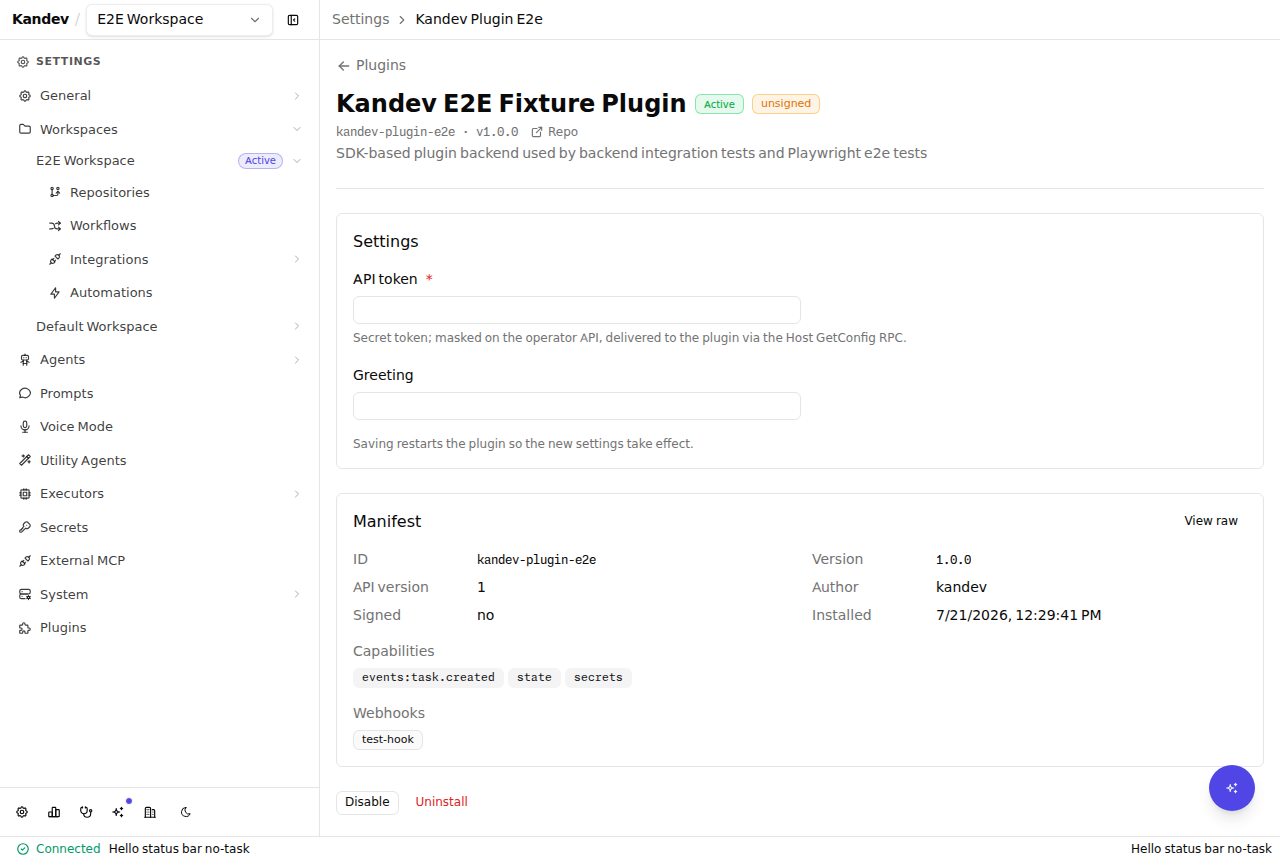
A plugin can also render its own UI inline on this page, at the top, above the
settings form, via the plugin-settings slot, for example a live
integration-health card ("CLI installed ✅ v0.45.2", "API token ✅
authenticated"). This is owner-scoped, so a plugin's card only ever appears on
its own settings page. See supported named
slots in the authoring guide.
Signed vs. unsigned packages
Every package's checksums.txt is verified at install time: this integrity
gate is always enforced. Signing (checksums.txt.sig, an ed25519 signature
over checksums.txt) is a separate, optional layer, and its verification
hook is not currently wired up in the shipped product: no signature is
cryptographically checked today, so every install, signed tarball or not,
is currently treated and reported as unsigned. A signed package installs
identically to an unsigned one; signing is not required in v1.
On-disk layout
~/.kandev/plugins/
├── <id>.yml                    # registration record (signed, status, install_path, last_error, last_error_at, ...)
├── <id>.config.yml             # operator-editable config (PATCH /api/plugins/{id})
└── <id>/
    ├── <version>/              # extracted package (InstallPath)
    │   ├── manifest.yaml
    │   ├── server/plugin-<goos>-<goarch>[.exe]
    │   └── ui/bundle.js         # optional
    └── data/                    # KANDEV_PLUGIN_DATA_DIR; shared across versions
Each <id>.yml registration record stores the installed package metadata and
host-managed runtime fields, including signed, last_error, and
last_error_at. The diagnostic fields are empty until a runtime failure is
recorded and are cleared after successful recovery.
Version retention on disk
Two extracted versions is the steady state for a plugin that runs: the one currently running and the one it replaced, which is what a failed upgrade falls back to. Older versions are deleted once a newer one is confirmed running, either right after the install that superseded them or at the next backend start. The retained count is fixed and not configurable.
It is a steady state rather than a hard cap, because the cleanup is
conservative and never insists. Kandev deletes a version directory only after
confirming that the plugin's process is up, so a plugin that is disabled,
errored, or was never started keeps every version it has, and a deletion that
fails leaves that version in place until the next attempt. It never
touches data/, a directory whose name does not match the version declared by
the manifest.yaml inside it, or anything outside ~/.kandev/plugins/<id>/.
Because an upgrade previously left its predecessor behind forever, an instance
that has been auto-updating for a long time can reclaim a substantial amount of
disk on its first restart after upgrading to this version.
Security posture
- Auth is the spawn relationship. Kandev spawns the plugin subprocess
itself over a unix domain socket (macOS/Linux) or loopback TCP (Windows),
never a routable network address, and secures it in both cases with the
go-plugin handshake plus AutoMTLS. There is no
api_key,webhook_secret, or HMAC signing anywhere in the contract. - Capability-based access control. A plugin can only call the Host RPCs
it declared in its manifest:
stategates the state RPCs,secretsgates the plugin-owned secret RPCs, and each read-only data accessor (tasks, sessions, workspaces, workflows, agent profiles, repositories) is gated individually viaapi_read:<resource>. Task create/update and message send are independently gated byapi_write:tasksandapi_write:messagesand use Kandev's first-party service paths. An undeclared capability returns gRPCPermissionDeniedwith a message naming the missing capability, checked before the handler runs.GetConfigandEmitEventare the only ungated RPCs: a plugin can always read its own config (secrets included) and emit events. - Native UI plugins run in-origin with full app-store access. This is an
accepted tradeoff, not an oversight: a plugin bundle shares the kandev
React instance and Zustand store so it can build UI indistinguishable from
first-party pages. In v1 only active, operator-installed plugins load;
a failing bundle or
initializeis caught and never breaks boot; slot components render behind error boundaries. Hard sandboxing (a worker or realm boundary) is explicit future work: see below. - Package integrity is always checked; signing is optional. See "Signed vs. unsigned packages" above.
- Curated marketplace, no auto-install. The Plugin marketplace adds one-click install from a catalog, but the official source is PR-curated (a plugin appears only after a maintainer approves it), install is always an explicit operator action, and updates require an explicit click: there is no automatic discovery or background install. kandev collects no download or usage telemetry.
Related: Authoring a plugin, Plugin manifest reference, and Extending Kandev.
Release Process
Run and verify Kandev's version, runtime, desktop, container, npm, GitHub, updater, Homebrew, and Scoop release automation.
Plugin Marketplace
Discover and install kandev plugins from the in-app catalog, keep them updated, add a team or corporate source, and publish your own plugin to the official catalog.