Executors
Choose and configure local, worktree, Docker, Kubernetes, SSH, or Sprites task environments.
An executor determines where Kandev creates a task environment and runs agentctl, the selected agent, terminals, and Git commands. An executor profile supplies reusable settings for that executor. A task environment is the concrete workspace created for one task; several sessions may reuse it.
Quick path
- Choose Worktree for normal isolated Git work.
- Choose Local only when sharing the selected checkout is intentional.
- Choose Docker, Kubernetes, SSH, or Sprites when the host boundary or remote location is part of the requirement.
- Review credentials, scripts, mounts, and network policy as part of the executor trust boundary.
Current support
| Executor | Current status | Workspace | Use it when |
|---|---|---|---|
| Worktree | Supported; normal default | Dedicated Git worktree on the Kandev host | Parallel coding on a trusted machine |
| Local | Supported | The selected checkout, or an explicit folder for a repository-free task | One controlled task must work in that exact folder |
| Local Docker | Supported when the global Docker runtime is enabled and its daemon is reachable | /workspace in a new Docker container | You need a repeatable container boundary |
| Kubernetes | Dependency-bound on cluster access, namespaced RBAC, admission, storage, and streaming support | /workspace in one Pod per task session | You need sessions scheduled inside an administrator-managed cluster boundary |
| Sprites.dev | Supported, provider-dependent | /workspace in a provider sandbox | You need remote compute and accept provider lifecycle/billing |
| SSH | Supported for repository sources on a trusted host | A task folder on a trusted SSH host | You need a remote host with SSH, SFTP, forwarding, and clone credentials |
| Remote Docker | Not implemented | None | Do not select or create this type |
mock_remote also exists in backend models for tests. It is not a product executor.
Remote Docker deserves explicit treatment: the backend registers the runtime type, but its create and stop methods return remote_docker runtime is not yet implemented. The current Settings > Executors hub does not offer it. Older routes and stored fields such as docker_host, docker_tls_verify, and docker_cert_path do not make it operational.
Embedded VS Code availability
VS Code (Embedded) starts code-server inside the active task environment, so its availability follows that session's executor rather than the operating system of the browser or desktop app. It is available for Local and Worktree sessions on Linux or macOS, and for Linux-backed Local Docker, Kubernetes, Sprites, and supported SSH sessions. Native Windows Local and Worktree sessions do not offer it. See Developer tools for code-server network and download requirements.
Create and select a profile
Open Settings > Executors, then choose Local, Worktree, Docker, Kubernetes, Sprites.dev, or SSH under Create New Profile. Local and Worktree profiles already exist in a new database.
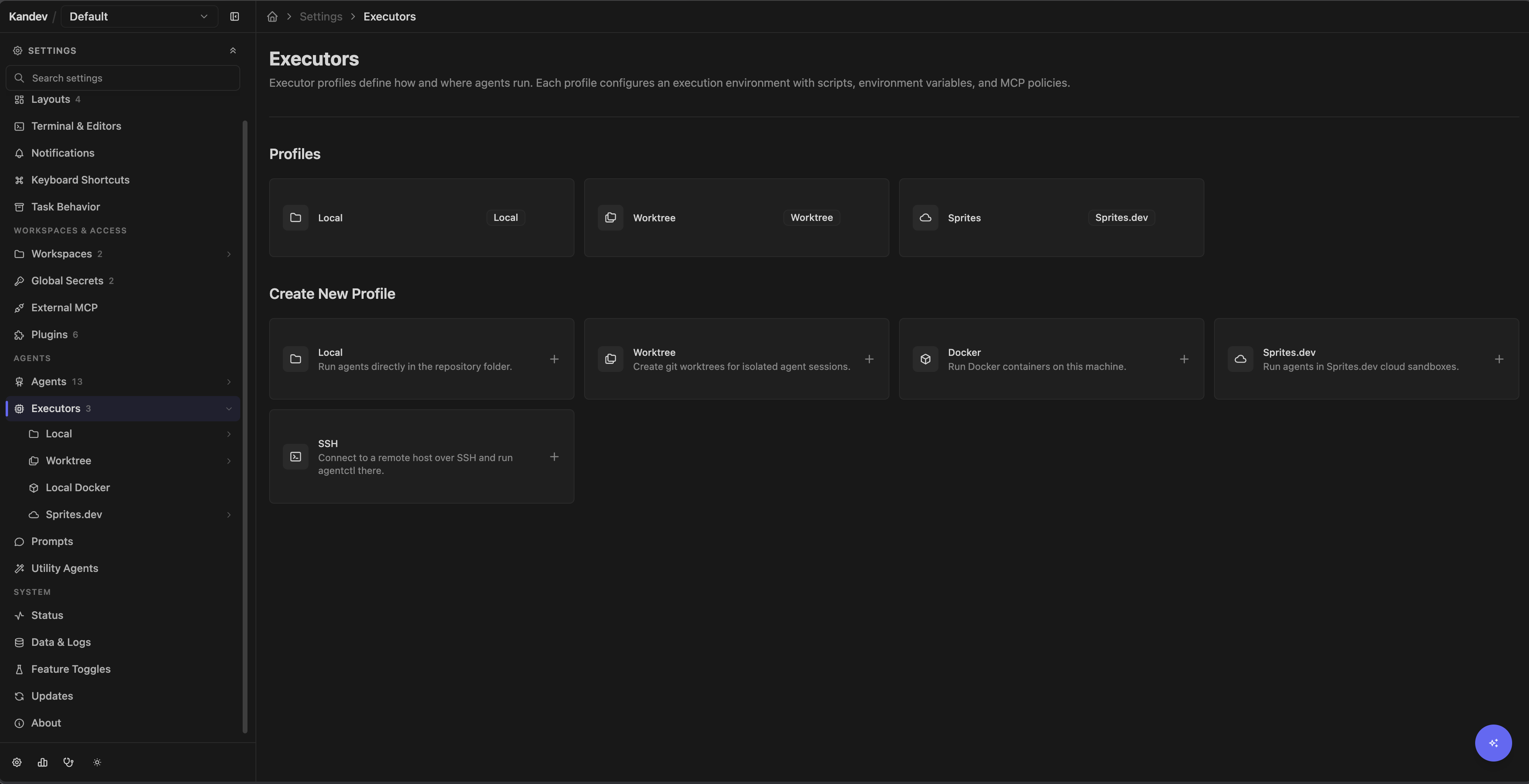
A profile stores:
- its name;
- environment variables, either as a literal value or a Kandev secret reference;
- a prepare script and cleanup script;
- an MCP policy JSON object;
- runtime-specific configuration.
Literal environment values are stored with the profile. Use secret references for credentials. Resolved values and copied credential files normally become accessible to the agent and commands in that environment, including repository setup scripts and the terminal panel's shells. A terminal that is already open keeps the environment it started with; open a new terminal after changing the profile. SSH is narrower: its remote agent process and terminals receive only the credential allowlist documented below, not arbitrary profile variables.
The MCP editor checks only that the value is a JSON object. Its presets cover stdio, HTTP, and SSE transport allowances, server allowlists, and URL rewrites. Test restrictive policies with the actual MCP servers the agent needs; see Automation and MCP.
Profile edits apply when Kandev provisions a launch, but a Docker container or Sprite resume can reconnect to the already provisioned process, image, environment, credentials, and files. Kubernetes records a separate workload snapshot for each session; changing its profile affects new sessions, while an existing session and any replacement Pod keep that snapshot. Use Reset Environment or explicitly destroy the resource when a change must take effect on a fresh environment. Deleting or editing a profile does not tear down an already-running resource.
Repository environment secrets
Open a workspace repository's editor to add Environment secrets bindings. Each binding maps a POSIX environment key to a Global secret or a Workspace secret from that same workspace. A task receives the bindings from every repository attached to it, along with its selected executor profile environment. The resolved snapshot is available to repository setup scripts, the agent, child shells, and new terminal-panel terminals on supported executors.
Kandev fails closed before provisioning when a repository binding is missing, deleted, unreadable, unauthorized, or from another workspace. It also rejects ambiguous keys: identical references to the same secret are merged, while different secret IDs, literal-versus-secret bindings, or different literal values for one key are a launch error. The error identifies the key and source origins without exposing secret values or IDs. Editing a binding or rotating a secret does not mutate a running process or an open terminal. Fresh provisioning, a cold recreation, or Reset Environment resolves the current bindings; warm resume keeps its existing snapshot.
SSH has an additional forwarding boundary. Remote agent and terminal instances receive the managed credential allowlist plus the repository keys explicitly approved by these bindings. Arbitrary host, request, or unrelated executor-profile variables are not forwarded to the remote process.
Portable agent configuration
Local Docker, Kubernetes, SSH, and Sprites profiles can copy selected agent configuration bundles. Open an agent row in the remote credentials settings to choose that agent's authentication files and configuration bundles independently. Kandev owns the allowlist. You cannot enter an arbitrary host path or copy a complete agent home.
Kandev copies each selected file without changes. A file can contain secrets, environment values, hooks, commands, model settings, permissions, MCP servers, endpoints, or host paths that do not work in the executor. A fresh provision or Reset Environment can replace the target file. A warm resume keeps the existing executor file and does not read the host again.
Each file is limited to 1 MiB and each launch is limited to 4 MiB. Kandev
writes copied files with owner-only mode 0600. Missing, unreadable, invalid,
or oversized optional files produce a preparation warning and do not stop the
launch. File contents are not returned by the API or stored in the profile.
SSH writes below the configured remote user's home. If that account is shared, the copied configuration can affect other processes that use the same account. Review the selected bundles before saving the profile.
Model selection in remote executors
The host model probe helps edit a profile, but it is not the launch authority. At launch, the selected executor's advertised ACP catalog decides whether Kandev sends the saved model. If the executor does not advertise that model, Kandev sends no request for it. It uses an advertised fallback only when one exists; otherwise the agent uses its current or default model.
Kandev writes one warning to task chat when this happens. The warning can list the requested model, effective model, agent, executor, and executor profile. It also tells you to check executor credentials, copied agent configuration, and the agent version. Kandev does not rewrite the saved profile model. Portable configuration can improve parity, but it does not guarantee equal host and executor model catalogs.
Script behavior is runtime-specific
Do not treat the two script fields as universal hooks:
| Runtime | Prepare script | Profile cleanup script |
|---|---|---|
| Local / Worktree | Runs on the host during preparation, with the common KANDEV_TASK_PREPARATION_TIMEOUT limit (10m by default). A failure is shown but is non-fatal, so the agent can still start for diagnosis. | Not executed by the executor runtime. Repository-level worktree cleanup is a separate repository setting. |
| Local Docker | Runs inside the container before agentctl, with the common preparation limit. Failure is logged but agentctl still starts. | Not executed. |
| Kubernetes | Runs in the main container before agentctl. The default is idempotent for a retained PVC; a failure aborts launch. Kandev injects the script and helper through Pod exec rather than requiring them in the image. | Runs in the verified main container only for terminal task/session archive or delete cleanup. Failure is logged but does not prevent exact Pod/PVC deletion. Plain Stop and backend restart preserve the Pod and workspace and skip cleanup. |
| Sprites | Runs inside a newly created sandbox, with the common preparation limit. Failure aborts the launch and destroys that new sandbox. | Runs, with a 60-second limit, only when a live execution is stopped with a task/session archived or deleted reason; failure does not prevent the subsequent destroy attempt. Plain Stop, Reset Environment, and profile-page direct destroy do not run this script. |
| SSH | Runs on the target before agentctl, with the common preparation limit. An empty profile script uses the SSH default, which materializes the primary repository at the task-workspace root, reuses a matching checkout, runs repository setup, and selects the Kandev branch. A non-zero exit, timeout, missing checkout, or conflicting origin aborts the launch. | Runs on the target, with a 60-second limit, only for task/session archive or delete stops. Failure is logged but does not prevent controller teardown. Plain Stop and backend restart preserve the task workspace and skip cleanup. |
Keep working prepare scripts noninteractive and idempotent. Kandev resolves supported placeholders and appends its managed branch checkout for Docker, Kubernetes, Sprites, and SSH after the user script. A profile cleanup script must never remove paths outside the environment it owns.
The common preparation limit is configured through
KANDEV_TASK_PREPARATION_TIMEOUT; see Configuration
for duration syntax, fallback behavior, and the derived launch-phase limit.
Two current preparation exceptions are easy to miss:
- A repository-free Local task bypasses the environment-preparer stage, even when it uses an explicit workspace folder. Its profile prepare script therefore does not run.
- A Worktree task with two or more attached repositories runs each repository's setup script while creating that repository's worktree, but the current multi-repository preparer does not run the executor profile's task-level prepare script.
Managed GitHub credentials
The workspace's GitHub connection and the task's Git transport policy are separate. Managed
workspace credentials is the default and provides the broker behavior below. Select Inherit
executor Git credentials in the workspace GitHub settings to leave Git and gh to the host or
selected executor; Kandev then injects no GitHub broker helper or shim. Local and Worktree use
host-visible Git/SSH credentials, while Docker, Kubernetes, SSH, and cloud require executor-configured
credentials. An explicit executor-profile GH_TOKEN or GITHUB_TOKEN overrides the managed
workspace route.
For attached GitHub repositories, Kandev normally gives the task an opaque lease for each
repository instead of placing the workspace PAT, selected CLI token, or App installation token in
its ambient environment. Git's credential helper selects the lease whose HTTPS host and path
exactly match the repository. A broker-aware gh shim redeems the primary repository lease for
each invocation, sets GH_TOKEN only on the child gh process, and isolates CLI configuration
from the host.
When the workspace uses a GitHub App, the redeemed installation token is minted for that one
repository. On a multi-repository task, Git can redeem each repository's lease, but App-backed
gh commands are primary-repository scoped. Run cross-repository GitHub API work through Kandev's
workspace-aware backend surfaces.
PAT and named-CLI automation tokens cannot be cryptographically reduced after redemption. Exact
lease matching prevents accidental cross-repository redemption, but the trusted agent subprocess
receives a bearer token with all scopes and repositories granted by GitHub. An explicit profile
GITHUB_TOKEN or GH_TOKEN bypasses managed broker selection entirely and is the operator's
unmanaged grant. Personal GitHub tokens and App registration private keys never enter executors.
Managed Docker, Kubernetes, Sprites, and SSH launches probe the exact credential-resolution route from inside
the executor before clone or agent startup and require its 204 No Content readiness response.
Network failures, redirects, proxy routing errors, and broker server errors stop launch instead of
falling back to another GitHub credential.
A newly opened task terminal and a CLI-passthrough agent tab use the same task-scoped Git and GitHub CLI routing as the agent that owns the execution. This applies only after the task ownership check and does not change Inherit executor Git credentials mode. A terminal that is already open keeps the environment from its launch; reopen it after a new session launch, resume, or a Git credential-policy change.
Workspace automation identity and task Git transport
The workspace GitHub connection is the automation identity Kandev uses for provider operations, such as finding or creating a pull request. The task Git credential policy is separate: it decides whether Git uses Kandev-managed credentials or the selected executor's own Git and SSH setup. Changing the workspace connection does not install an SSH key in an executor.
For Inherit executor Git credentials, configure the executor where Git runs. Local and Worktree
use the Kandev host's Git configuration, SSH agent, known-hosts file, and credential helpers.
Docker uses the credentials in the container, while SSH and Sprites use the credentials configured
on the remote environment. A host gh login or ~/.ssh file is not automatically available in a
Docker, SSH, or Sprite executor.
To make host GitHub CLI operations prefer SSH, run this on the Kandev host:
gh config set git_protocol ssh --host github.comRestart Kandev after changing the host GitHub protocol. The restart lets Kandev reconcile managed repository origins before the next task launch. For an SSH or Docker executor, configure the equivalent GitHub SSH access, known-hosts entry, and agent or key on that executor instead.
Worktree
Worktree creates a dedicated host Git worktree and runs the standalone agentctl service against it. It separates branches and files between tasks, but the process still has the Kandev user's host permissions, network access, and readable credentials.
Repository settings control base branch, branch naming, pull-before-create, repository setup/cleanup scripts, and optional copies of ignored files. With Always pull before creating a new worktree enabled, a host Worktree refresh is best effort when the selected local base exists. An authentication, network, timeout, missing-ref, divergent-ref, or uncertain-ancestry error produces a credential-safe warning and the host worktree uses the verified local base. The warning states that remote changes may be missing. For a numbered GitHub PR, the current PR base is used when available. A proven deleted remote base can use a separately refreshed configured fallback branch, often the repository default, and produces a warning; authentication, network, timeout, and other unproven PR refresh failures remain fatal. If no usable local base exists, or if the executor must materialize the repository remotely, refresh and checkout remain required and a failure stops the launch. Disable this setting only for an intentional offline local workflow. Copy ignored files narrowly: .env and similar files often contain production secrets. Multi-repository tasks receive one materialized worktree per attachment; use the per-repository setup scripts because the profile-level prepare script is currently skipped for that path.
Normal stop keeps the task environment available. Task deletion or Reset Environment removes the tracked worktree when configured to clean worktrees. Preserve or push valuable changes first; see Git Operations.
Typical failures:
- dirty or conflicting source repository state;
- a base branch is missing locally and remote materialization cannot provide it;
- a remote-only executor cannot verify its refresh or checkout;
- worktree path already registered in Git metadata;
- setup dependencies absent on the host;
- repository cleanup failure leaving a stale worktree.
Use git worktree list --porcelain in the source repository when diagnosing stale registrations. Do not delete a worktree directory by hand before checking whether Git still tracks it.
Local
Local runs directly in the selected checkout. It provides no file isolation: concurrent tasks, the user, and other tools can edit the same files. When sources are attached, Local uses each user-owned repository's current checkout; Kandev does not switch its branch.
Use Local for an intentionally shared checkout, a controlled single task, or a repository-free task with an explicit workspace folder. Prefer Worktree for parallel coding. Stop ends the agent process but does not clean the checkout or undo its changes.
Workspace sources
An idle, non-archived repository-backed task can add sources from its Files panel. Repository sources (saved workspace repository, local Git repository, or remote Git repository) are supported on Worktree, Local/Local PC, Local Docker, Kubernetes, SSH, and Sprites. Worktree materializes Remote Git from Kandev's owned host cache. Docker, Kubernetes, SSH, and Sprites clone local Git sources and therefore require a cloneable origin; Worktree and Local/Local PC can use the host repository directly.
Every repository row records a base branch. Worktree, Docker, SSH, and Sprites may also materialize an existing checkout branch for repository rows. Local/Local PC always uses the repository's current checkout and does not offer or perform a branch switch.
Arbitrary folders are supported only on Worktree and Local/Local PC. They remain live host paths; Kandev links them into its task workspace and never copies, moves, or deletes their contents. Docker and remote executors do not offer folders and reject a forged folder request. Remote Docker remains unavailable because its runtime is not implemented.
Source batches are atomic: if validation, cloning, or runtime adoption fails, Kandev removes the new records and Kandev-owned entries while preserving existing task contents. Persisted attachments are reapplied after reload, relaunch, or Reset Environment; a previously attached folder that later disappears is reported instead of silently skipped. See Tasks and workflows.
Local Docker
Daemon authority: Dockerfile instructions run with the configured daemon's authority. Treat profile creation as an administrative operation on that daemon.
Local Docker details
Prerequisites and profile creation
Install a reachable Docker Engine and leave docker.enabled: true (the non-containerized backend default). The published Kandev service image overrides this to false; see Docker. The runtime health method is currently a no-op and the client is initialized lazily, so a green control-plane startup does not prove daemon access; image build or first task launch is the effective check.
Choose Settings > Executors > Docker. The current UI requires an image tag, Dockerfile content, and a successful Build Image operation before it creates the profile. Use defaults supplies:
- image tag
kandev/multi-agent:latest; node:22-slim;git, CA certificates, andcurl;/workspaceas the working directory.
The build request sends a single Dockerfile-only context to the configured daemon. COPY cannot see repository files. Every Dockerfile instruction runs with the daemon's authority, so profile creation is an administrative operation on that daemon.
At launch Kandev:
- uses the profile's
image_tag; - creates
kandev-agent-<execution-prefix>with Kandev task/session labels; - bind-mounts a released Linux
agentctlhelper read-only at/usr/local/bin/agentctl; - publishes control and agent ports to random ports on Docker-host loopback;
- runs the resolved prepare script, which normally clones attached repositories into
/workspaceand checks out the Kandev branch; - starts
agentctleven if prepare failed, then creates the agent instance.
The repository workspace itself is not a normal host bind mount. For a local filesystem clone URL, Kandev temporarily mounts that local clone source read-only so the in-container git clone can read it. Images need the selected agent's dependencies; they do not need to contain agentctl.
The daemon connection comes from global Kandev configuration. At present, the client uses docker.host and optional docker.apiVersion. The accepted docker.tlsVerify, docker.defaultNetwork, and docker.volumeBasePath settings are not applied by the current Docker client/container manager. Per-executor docker_host values are also not used by this runtime.
The current container manager always selects the Linux/amd64 agentctl helper. Use a Linux/amd64-compatible agent image and daemon (native or correctly emulated); native ARM64 agent containers are not yet wired to the released ARM64 helper.
Kandev passes each agent definition's CPU and memory limits to Docker. These are agent implementation defaults, not executor-profile controls. Apply additional daemon, cgroup, storage, and network policy outside Kandev when required.
Credentials and security
Trust boundary: A container is useful but not a hostile-code sandbox. The daemon has host-level power, bind mounts expose sources, agents can use injected secrets, and the default image has outbound network access. Kandev does not mount the Docker socket automatically.
Docker credential and security details
Docker profiles can inject resolved environment secrets. For agent file-based authentication, Kandev selectively seeds a per-execution directory under <KANDEV_HOME_DIR>/agent-sessions/ and mounts that directory at the agent's expected config path. It does not intentionally mount the entire host home.
A container is a useful boundary, not a hostile-code security sandbox. The Docker daemon has host-level power, bind mounts expose their sources, the agent can use every injected secret, and the default image has outbound network access. Kandev does not mount the Docker socket into agent containers automatically.
Plain Stop preserves a healthy container for resume. A later launch reconnects to an existing running container, or starts one in a stopped/exited state; if reconnect fails, it creates a fresh container. Archive, delete, stale cleanup, explicit removal in the profile page, and Reset Environment can stop or force-remove it. Inspect matching containers before manual cleanup:
docker ps -a --filter label=kandev.managed=trueKubernetes
Cluster authority: A Kubernetes profile is an administrator-authored Pod template. It can request powerful workload settings, and every injected task credential is available to the main container. Use admission policy, a dedicated namespace, a narrowly scoped API identity, and a separate workload service account.
Kubernetes maps one task session to one namespaced Pod and reaches the injected agentctl through a process-local 127.0.0.1 port-forward. The backend can authenticate from an absolute kubeconfig path on the Kandev host or from its own in-cluster service account. It never falls back to a local executor when cluster configuration, admission, exec, or port-forward fails.
The current experimental matrix validates API and agentctl connectivity on Kubernetes 1.34.8 and 1.36.1 and runs the full lifecycle suite on 1.36.1. Other server versions have not yet been validated.
Choose Settings > Executors > Kubernetes. Only an administrator can create, change, delete, or test a Kubernetes executor or profile. Members can view and select configured profiles, start or resume their own authorized sessions, and read the sanitized session inventory. Administrator change and deletion confirmations use a global impact count without exposing cross-user task or session identities.
Opening a saved Kubernetes profile puts the shared cluster connection editor, connection test, and executor-wide active sessions before workload settings. The test uses current unsaved connection and profile values. Administrators edit both resources through one Save/Reset flow, while members see the same hierarchy read-only. Configured executor rows and task settings icons open the selected profile directly; the standalone connection route remains only for an executor with no profiles.
Kubernetes Pod glyphs on Kanban cards and in task lists hydrate from the exact task/session status when they render, before any hover. Fine-pointer hover or keyboard focus shows a compact structured Pod summary; touch opens the same summary in a bottom Drawer without activating the task row. Duplicate indicators for the same session share the current read instead of issuing parallel requests.
Each executor fixes one namespace and connection configuration. Each profile supplies one strict core/v1 PodTemplate, a main-container name, linux/amd64 or linux/arm64, and one workspace mode:
| Workspace mode | Persistence and ownership |
|---|---|
| Managed PVC | Kandev creates one claim for the session, preserves it across ordinary stop, backend restart, and Pod replacement, then deletes it only during terminal or forced cleanup after exact identity checks. |
emptyDir | Fast Pod-scoped storage. It survives a main-container restart but is lost with the Pod, so a missing Pod cannot be recovered. No PVC permission is required. |
| Existing claim | Kandev verifies and mounts the named claim in the executor namespace. It never creates or deletes that claim. Concurrent-access safety depends on the claim and application. |
The starter template uses ghcr.io/kdlbs/kandev:latest, which is a moving tag. Pin a released ghcr.io/kdlbs/kandev:X.Y.Z tag or immutable digest for controlled environments. A custom main-container image must match the selected Linux architecture and provide sh, sleep, git, Node.js, npm, the selected agent CLI or its installation prerequisites, CA trust, and any repository build tools. It must also allow the runtime user to write /opt/kandev, /run/kandev/home, and /workspace; set a compatible user/group or Pod fsGroup when the storage driver requires it.
Ordinary Stop, agent restart, main-container restart, and backend restart preserve the Pod and workspace. Resume verifies the recorded name, UID, and complete ownership-label identity, creates a new local port-forward, and reconnects. Every managed create also carries a fresh 256-bit request nonce so an ambiguous API response cannot make Kandev adopt or delete a copied-label object. Archive/delete terminal cleanup or an explicit force cleanup deletes only the exact recorded Pod and, for managed storage, the exact Kandev-created PVC. A same-name object with another UID, ownership identity, or create nonce is left untouched and cleanup fails closed.
Saved executor connection settings are different from the recorded workload snapshot. Current kubeconfig/in-cluster credentials, context, and timeout are used to reach an existing session; changing them can restore or break reconnect and cleanup. Existing sessions continue to target their recorded namespace even if the saved namespace changes, and the saved namespace affects new sessions only. Current Pod template, image, platform, main container, and storage settings also affect new sessions only. If Kandev must replace a missing Pod, it uses the recorded namespace and workload snapshot rather than the edited profile.
An executor cannot be deleted or changed into or out of Kubernetes while runtime inventory still references it. Clear the sessions through normal terminal cleanup first; deleting a profile does not mutate or destroy a retained workload.
See Kubernetes for kubeconfig and in-cluster setup, the opt-in namespaced RBAC manifest, exact ownership labels, diagnostics, template rules, and recovery guidance.
Sprites.dev
Credentials and network: Sprites sandboxes receive highly sensitive data. Credential upload is best effort, and network policy is installed only after credential upload, prepare, controller startup, and agent-instance creation; bootstrap traffic may happen first, so the policy is not a security boundary.
Sprites.dev details
Configure
- Save the provider token as a Kandev secret.
- Choose Settings > Executors > Sprites.dev.
- Select that secret for the required
SPRITES_API_TOKENprofile environment variable. - Review remote credential methods, Git identity, prepare/cleanup scripts, and network policy.
Sprites profiles do not copy the host-active gh CLI token. Kandev may copy explicitly selected agent credential files, resolve selected Kandev secrets into agent environment variables, or run an agent auth setup script. A profile-selected GitHub token is an unmanaged override; otherwise an attached GitHub repository uses the workspace credential broker. Set githubCredentialBroker.publicBaseUrl (or KANDEV_GITHUB_CREDENTIAL_BROKER_PUBLIC_BASE_URL) to an HTTPS Kandev URL reachable from remote executors. To recover managed Git credentials after a backend restart, configure the stable secret githubCredentialBroker.reissueSigningKey (or KANDEV_GITHUB_CREDENTIAL_BROKER_REISSUE_SIGNING_KEY); changing it invalidates outstanding execution capabilities. Drain or quiesce active agent sessions before key rotation. The broker uses /api/v1/git/credentials/resolve and /api/v1/git/credentials/reissue; the older GitHub paths remain compatibility aliases. These settings are independent of GitHub App registration. Credential upload is best-effort: provisioning can continue while later agent authentication fails. The remote sandbox receives highly sensitive data; use a scoped provider token and least-privilege repository credentials.
Network rules are stored in sprites_network_policy_rules as JSON entries with domain, action (allow or deny), and optional include. Kandev applies them only on fresh sandbox creation, and currently does so after credential upload, prepare, controller startup, and agent-instance creation. Bootstrap traffic can therefore occur before the profile policy is installed. A parse/provider failure is reported as skipped and does not abort launch. Provider semantics remain authoritative; do not treat this late, best-effort step as a security boundary, and test the resulting policy.
Fresh launch creates a sandbox named kandev-<execution-prefix>, uploads the Linux/amd64 agentctl, uploads credentials, runs prepare, starts the controller, and opens a local proxy to its control port. The current Sprites path does not probe sandbox architecture; it assumes x86-64. A failed fresh launch destroys the new sandbox. Resume reconnects to the recorded sandbox; if it no longer exists or has expired, Kandev warns and provisions a fresh one on the recorded branch.
Plain Stop preserves the sandbox and workspace for resume. Archive/delete terminal stops attempt to destroy it, and the profile page can list and explicitly destroy Kandev-named sandboxes with the selected provider token. Reset Environment also requests sandbox destruction, but the current direct-reset path does not carry the profile's Sprites secret into that destroy request; after a reset or backend restart, verify the old sandbox in the profile page and destroy it there if it remains. Provider retention, quotas, network behavior, and billing remain provider-dependent. Destroying a sandbox out of band breaks any session that still references it.
SSH
Trust boundary: Verify the target host fingerprint before saving. Kandev pins the target key, but unknown ProxyJump bastion keys may be accepted on first use; remote credential transfers write sensitive material under the remote user's home.
SSH details
SSH is implemented as a separate remote connection per session. Kandev uploads a platform-matched agentctl helper over SFTP, starts it in the remote task directory, and forwards its port to local loopback.
Host requirements
- Linux
amd64/arm64or macOSamd64/arm64; - SSH public-key authentication and SFTP;
bashon Linux orzshon macOS by default, or a compatible configured login shell;- TCP forwarding enabled by
sshdand enoughMaxSessionscapacity; - the selected agent command already installed and visible to a login shell;
- writable remote home and adequate disk/process capacity.
Released Kandev bundles include helpers for all four platform combinations. The full automated SSH task E2E target currently exercises a Linux/amd64 container; other platform gates and helper selection are unit-tested.
Create the connection
Choose Settings > Executors > SSH. Enter a name plus either a Host or a host alias from your OpenSSH client configuration. The backend resolver can inherit HostName, Port, User, IdentityAgent, IdentityFile, and one ProxyJump; explicit form values win. The current create form defaults and persists Port 22 and identity source ssh-agent, so enter a non-22 alias port and desired identity source explicitly instead of assuming those two values inherit. IdentitiesOnly and arbitrary OpenSSH directives are not consumed by Kandev.
Authentication choices are:
- ssh-agent, using the host's expanded
IdentityAgentwhen configured and otherwise$SSH_AUTH_SOCK; or - an unencrypted private-key file.
IdentityAgent none disables agent authentication for that host. Kandev expands ~, ${VAR}, whole-value $VAR, SSH_AUTH_SOCK, and the %%, %d, %h, %i, %j, %k, %L, %l, %n, %p, %r, and %u OpenSSH tokens in agent socket paths; %C is not supported. Password and keyboard-interactive authentication are not supported. A passphrase-protected key file must first be loaded with ssh-add, then used through ssh-agent.
Run Test Connection, independently verify the observed SHA256 host fingerprint, select Trust this host, then save. Kandev pins the final target fingerprint and refuses a changed key. With ProxyJump, the target remains pinned, but bastion handling is weaker: Kandev checks ~/.ssh/known_hosts when available and rejects a changed known key, while an unknown bastion key is accepted on first use. Verify and pre-populate the bastion key yourself.
The profile editor exposes remote shell and agent-readiness checks. Backend/API configuration also recognizes ssh_workdir_root (default ~/.kandev) and ssh_shell; the current profile UI exposes ssh_shell but not a workdir-root field.
The remote-auth card is built from the currently enabled agents. Depending on an agent's declared methods, it can copy selected local credential files, resolve a stored secret into that agent's authentication environment variable, or run an agent-specific setup script on the remote host. GitHub can use an explicitly selected GITHUB_TOKEN secret as an unmanaged profile override; Kandev does not copy the host-active gh token. These transfers write sensitive material under the remote user's home and are best-effort, verify authentication on the remote after saving. Although the profile editor also stores Git name/email controls for SSH, the current SSH runtime does not apply them; configure Git identity on the remote host yourself.
Repository sources and cleanup
Cleanup: SSH task directories, session-runtime data, and cached helpers may remain after disconnect. Audit remote processes and paths before deleting anything.
SSH repository source details
SSH materializes the primary attached repository at the remote task-workspace root and additional repository sources in direct child directories. The default prepare script initializes or reuses the root checkout, verifies the configured origin, fetches the base branch, runs repository setup, and lets Kandev's managed postlude select the task branch. A stored profile script replaces that default and must leave the same verified primary checkout before agentctl starts. Existing matching checkouts retain local commits and untracked files; a different origin, missing checkout, failed script, timeout, or cancellation fails the launch before a controller is started. Ensure the remote host has the required Git credentials and can reach every selected remote; folders cannot be attached to SSH tasks.
The runtime preflights the selected agent command and reports an installation hint when missing; it does not install the agent or its toolchain. Only these resolved credential environment names are forwarded to the remote agent: CLAUDE_CODE_OAUTH_TOKEN, ANTHROPIC_API_KEY, OPENAI_API_KEY, GEMINI_API_KEY, GOOGLE_API_KEY, GITHUB_TOKEN, and GH_TOKEN. Arbitrary profile variables and control-plane process variables are not forwarded to that agent process. Agent-specific auth setup scripts can still consume a selected stored secret and materialize their own remote login state.
Stop attempts to kill the session's remote agentctl and remove only the remote session-runtime directory, then closes forwarding and SSH. Terminal archive/delete stops run the profile cleanup script first; cleanup is best-effort, so a failure does not block controller teardown. Plain Stop and backend restart skip cleanup and preserve the task workspace for resume. The task directory always remains and no background sweeper currently removes it. The cached helper and checksum at ~/.kandev/bin/agentctl and agentctl.sha256 also remain for later sessions. Periodically audit the remote process list, session directories, and <workdir-root>/tasks/ after confirming no session needs the data. Resume re-dials SSH and reuses a live recorded PID when possible; otherwise Kandev starts a fresh remote controller and re-runs preparation.
Lifecycle and cleanup
The task environment reports creating, ready, stopped, or failed; individual execution records have finer states. Stop is deliberately not synonymous with destroy for resumable Docker, Kubernetes, and Sprites environments.
Use a task's Reset Environment action when you need a clean materialization. Kandev blocks reset while a task session is starting or running, can optionally push the current branch, and requests teardown of the recorded worktree, container, Pod/managed PVC, or sandbox. It normally keeps the environment record when teardown returns an error. Kubernetes keeps an existing claim and refuses deletion when recorded UID or ownership identity is ambiguous. The current Sprites credential-context limitation described above can instead report success while leaving the provider sandbox, so verify it separately. SSH task directories are intentionally retained; use the profile cleanup script for terminal hook work and remove the directory manually only after confirming no session needs it.
Before deleting any environment, push or otherwise preserve uncommitted work. Profile deletion and provider/daemon-side deletion can bypass normal lifecycle safeguards.
Troubleshooting
- Profile missing at launch: ensure the executor is active, the profile still exists, and the task/workflow references the correct IDs.
- Prepare reports failure but agent starts: expected for Local, Worktree, and Docker; inspect the failed step output and retry commands inside the same environment.
- Docker unavailable: verify global
docker.enabled, effectivedocker.host, daemon permission, image existence, and the released Linux helper path. - Docker clone fails: test the clone URL, base branch, DNS, CA trust, and token scope from inside the selected image.
- Kubernetes test fails at streaming: check
pods/execandpods/portforwardget/create, API proxy WebSocket/SPDY upgrades, probe-Pod scheduling, and image support forsh/sleep. - Kubernetes session cannot resume or clean up: restore cluster credentials and context that can reach the recorded namespace, then compare the recorded Pod/PVC UID and complete ownership labels. Do not delete a same-name object.
- Kubernetes workspace fails: inspect StorageClass, quota, claim binding/access mode, volume permissions, runtime user, and Pod
fsGroup; anemptyDirworkspace cannot survive a missing Pod. - Sprite cannot resume: check provider token, quota, sandbox existence, expiration, and network policy; a missing sandbox triggers fresh provisioning.
- SSH handshake fails: test ssh-agent/key access, host fingerprint, bastion trust, SFTP, TCP forwarding, and remote OS/architecture.
- SSH agent is missing: run the reported
command -vcheck through the configured login shell and install the agent on that host. - Disk usage grows: inspect Settings > System > Disk usage, Docker containers, provider sandboxes, host worktrees, and retained SSH task directories before removal.
Related guides: Docker, Git Operations, Operations, and Windows Support.